Fan-Made Wiki · Roblox

Crash Engine Wiki - Car Destruction, Sandbox & Codes

Explore Crash Engine on Roblox with car destruction sandbox guides, crash physics tips, and current code information for players.

34.6KPlaying now
6.1M+Total visits
86%Rating
22.8KFavorites
Crash Engine Wiki - Car Destruction, Sandbox & Codes
Beginner Guide

Crash Engine Beginner Guide

1

Start with the free Starter Car

Select the free Starter Car from the Garage and spawn into an available driving area. Before attempting a Task, confirm the vehicle appears and responds to steering, braking, camera movement, and basic driving. Choose one nearby wall, Box, or visible obstacle rather than building a large course, then approach at a manageable speed for a clear first contact.

  • Confirm the Starter Car spawns successfully.
  • Choose one nearby, visible obstacle.
  • Test steering and braking first.
2

Read Tasks and make a baseline crash

Inspect the upper-left Tasks panel and identify whether the current objective involves an impact, damaged part, or location. Drive toward the selected target without adding extra equipment, watching grip, steering, skidding, and braking. After contact, observe bent metal, broken glass, or detached parts, then compare the visible damage with the exact impact location.

  • Match the target to the current objective.
  • Keep the first route short and readable.
  • Observe damage before changing variables.
3

Repair and complete a matching objective

Use Repair when the vehicle becomes too damaged to steer or stops in an unusable position; the beginner controls report `R`, but follow the current on-screen control if needed. Confirm the car has respawned, repeat the same route, and complete the matching Task, named-part impact, or location objective. Reread the panel if completion does not update.

  • Repair before rebuilding an unusable test.
  • Repeat the same route for comparison.
  • Check Task wording when progress stalls.
4

Earn Coins and expand the experiment

Spend Coins earned from crashes and Tasks on the next experiment rather than buying randomly. Add only one controlled tool, such as a Speed Pad, low Kicker with Landing, or Barrier, while preserving a clear route from start through approach and target. Compare vehicles on the same route, reposition targets with Grab Mode, and treat multiplayer collisions as less predictable.

  • Keep Coins separate from Robux.
  • Change one crash variable at a time.
  • Prefer efficiency tools before decoration.
Codes tracker

Crash Engine Codes

Latest collection
Current Status

No Codes Released Yet

Crash Engine has not started a code campaign yet. The developer has not published redeemable codes so far, and this page becomes the first place they appear the moment that changes.

Official Sources

Where Codes Will Drop

Future codes arrive through official channels: the Crash Engine Roblox game page and developer community posts. Check back after every major update and event.

Step By Step

How To Redeem Codes

Once codes go live, open Crash Engine, find the codes button in the game menu, type the code exactly as shown, and your reward lands on your account instantly.

Money Sources

Crash Engine Money Sources

SourceActionRequirementResult
Crash RewardsDrive into obstaclesDrivable CarCrashes award Money
TasksComplete current taskFollow task instructionAdditional Money
High-impact SetupCreate stronger crashUsable Build ItemsNo fixed multiplier
Cars

Crash Engine Cars

CategoryRoleAcquisitionUsefulUnconfirmed
Starter CarInitial vehicleEntering the gameLearning crash behaviorModel name
Purchasable CarsAlternative vehiclesCrash task moneyComparing vehicle setupsPrices and unlocks
V8 CarsPower exampleNot specifiedCollision experimentsSpecific model
All Wheel DriveDrivetrain exampleNot specifiedTesting tractionSpecific model
Task Progression

Crash Engine Task Progression

1

Read and classify the active task

Open the Tasks panel in the upper-left corner and read its complete wording before driving. Decide whether the objective requires a collision, detached vehicle parts, a location, or a sustained vehicle state. Use Suggested area as a search region rather than an exact marker, and treat the panel as the authority for current objectives, rewards, and completion status.

  • Identify the required objective type.
  • Confirm the suggested area before routing.
2

Complete the first collision objective

When Crash into anything appears, use the default free car and drive into a map object with enough contact to register the crash. Watch for visible collision feedback and a changed task state, because a barely noticeable brush may not count. After completion, read the next objective instead of repeating the same collision without checking the panel.

  • Use the default free car.
  • Confirm completion in the task panel.
3

Remove both mirrors from your car

If the next objective says Knock off two mirrors, position your own vehicle for a controlled impact that contacts its mirrors rather than merely scraping the body. Continue until both mirrors visibly detach, then check the panel for credit. Damage to another player’s car does not satisfy this task, so repair or reposition your own vehicle when necessary.

  • Target your own vehicle’s mirrors.
  • Verify both parts detached.
4

Reach locations and sustain vehicle states

For Reach the top of a pyramid, use Suggested area to locate the structure and drive onto its upper surface; touching the base is insufficient. If the panel requests a rollover, use a ramp or collision to begin it and maintain the required state for about 10 seconds. Always follow the current panel wording because labels and rewards may vary.

  • Reach the pyramid’s top surface.
  • Follow the current rollover timer.
5

Repair and continue after verification

After each attempt, verify the expected checkpoint in the panel: registered collision, detached parts, pyramid summit, timed vehicle state, or changed objective. Press R when damage prevents reliable steering or another attempt. If the task set finishes, continue driving, exploring, earning Money through ordinary crashes, or preparing build items while waiting for a refresh rather than assuming replacement is immediate.

  • Repair before repeating unreliable attempts.
  • Treat five minutes as approximate.
Build Items

Crash Engine Build Items

ItemRoleFunctionCost
BlockBuild pieceCreates approach lanes1
WedgeBuild pieceChanges height direction1
SpawnUtility pieceSets test starting point1
TeleportUtility pieceConnects build areasUp to 10
KickerRampLaunches vehicle upward3
LandingLandingCatches vehicle jumps3
BarrierObstacleCreates direct impacts3
Speed PadPadIncreases entry speedCheck shop
BrakePadStops vehicle movementCheck shop
Engine FireDamage padTests ignition damageCheck shop
Bowling BallPropRolls into vehiclesCheck shop
CannonPropFires iron ballsFive slots
Crash DummyRagdoll propTests character collisionsFive slots
More ObjectsExpansionAdds object capacity15 25 50 slots
Crash Physics

Crash Engine Crash Physics

Damage Feedback

Crash Results

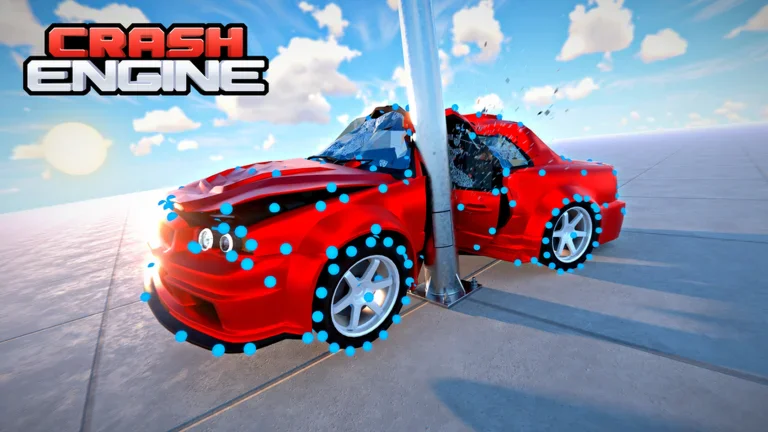
Crash Engine shows localized body deformation, broken glass, detached parts, loss of control, and vehicle destruction based on collision conditions.

  • Inspect deformation near the actual impact area.
  • Treat broken glass as collision feedback.
  • Confirm destruction only when visibly unusable.
Key Variables

Crash Conditions

Speed, vehicle weight, handling, contact angle, target, and landing position combine to produce different crash outcomes across experiments in controlled tests.

  • Keep the same car for cleaner comparisons.
  • Change one physical condition at a time.
  • Assess ramp launches separately from landings.
Test Tools

Experiment Tools

Grab Mode, Speed Pads, ramps, Bowling Balls, Crash Dummies, cameras, and recovery actions help create repeatable setups and inspect controlled crash experiments safely.

  • Use Grab Mode to position objects precisely.
  • Add Speed Pads before selected targets.
  • Recover damaged vehicles between repeated tests.
Testing Method

Impact Comparisons

Start with a baseline collision, then compare speed, angle, mass, and target changes while recording visible damage and driving behavior.

  • Begin with one target and moderate speed.
  • Inspect front, sides, glass, and detached parts.
  • Record whether the vehicle still drives.
Objectives

Crash Objectives

Collisions can award Money, support damage-related Tasks, and involve multiplayer vehicle tests, but rewards and success depend on displayed conditions.

  • Check the current reward display after impacts.
  • Match task targets and requested damage states.
  • Use coordinated partners for repeatable multiplayer collisions.
Shared Maps

Crash Engine Shared Maps

Main area

Testing Baseplate

Testing Baseplate is Crash Engine’s confirmed shared environment for spawning, driving, task navigation, ramps, tunnels, and repeatable soft-body crash testing.

  • Spawn with the free starting car.
  • Follow roads, obstacles, and current task directions.
  • Repair damaged vehicles before unreliable attempts.
Crash testing

Crash Areas

Crash areas provide straightforward spaces for learning steering, braking, impact angles, vehicle damage, and the repair loop without requiring special map access.

  • Drive into available walls and collision surfaces.
  • Inspect which vehicle parts absorbed damage.
  • Use repeatable impacts to support Money progression.
Jumps

Ramps

Ramps support jumps, rolls, and hard landings, while speed, approach angles, Speed Pads, and build items change the resulting crash.

  • Build speed while keeping takeoff controllable.
  • Change one setup element between crash tests.
  • Repair before repeating unreliable landing attempts.
Underground route

Tunnels and Underground Hall

The large tunnel connects Testing Baseplate with Underground Hall, offering enclosed collisions and exploration without confirmed teleport access or separate unlock requirements.

  • Follow the large tunnel from the baseplate.
  • Drive slowly through narrow enclosed sections.
  • Do not assume additional underground rooms or rewards.
Location tasks

Pyramid

The Pyramid is a shared-baseplate landmark for vertical driving and location objectives, with Suggested Area guiding navigation rather than teleporting players.

  • Drive through the baseplate toward the landmark.
  • Continue upward when the task requires its top.
  • Verify the checkpoint using the current task panel.
Shared activities

One Shared Environment

Highways, off-road routes, mountain descents, Train Stop, Roleplay, and Demolition Derby describe activities within the shared environment, not confirmed separate maps.

  • Treat named activities as sessions inside one baseplate.
  • Coordinate before colliding with other players’ vehicles.
  • Follow live task wording over example routes.

Crash Engine FAQ

Get the basics on Crash Engine's crash loop, progression systems, experiments, and current code status before you start playing.

What is Crash Engine on Roblox?

Crash Engine is a soft-body vehicle simulation where cars bend, break, lose parts, and fall apart when they hit objects, ramps, props, or other vehicles. You can drive, build crash setups, complete tasks, and play around with other players in the crash environment.

How does a new player start in Crash Engine?

Start with the free default car in the available testing map, then open the task panel and select the first objective. Drive into objects to damage the car, earn money from crashes and tasks, and repair or respawn the vehicle when it is destroyed.

How do you earn money in Crash Engine?

Money comes from crashing cars and completing tasks, with harder impacts potentially producing more money. Spend it on better cars, speed pads, brakes, props, and other construction items.

What can you do with cars in Crash Engine?

You can buy additional drivable cars after earning enough money, and cars differ in speed, power, engine, and drivetrain. The free starter car is enough to begin tasks and crash experiments before you choose an upgrade.

How do Grab mode and build items work?

Grab mode lets you pick up, throw, and reposition cars or objects for controlled crash setups. Placeable items such as speed pads, ramps, brakes, bowling balls, cannons, wheel drums, and crash dummies let you create repeatable impacts and experiments.

Are there any current Crash Engine codes?

The current code record contains no active Crash Engine codes or listed rewards. Check the code status again when the game adds a new promotion rather than relying on unverified code lists.